
Skip to content
VercelLogotypeVercelLogotype
LoginSign Up

ChatGPT app with Next.js

Ship a ChatGPT app on Vercel with Next.js and Model Context Protocol (MCP).

DeployView Demo

ChatGPT Apps SDK Next.js Starter

A minimal Next.js application demonstrating how to build an OpenAI Apps SDK compatible MCP server with widget rendering in ChatGPT.

Overview

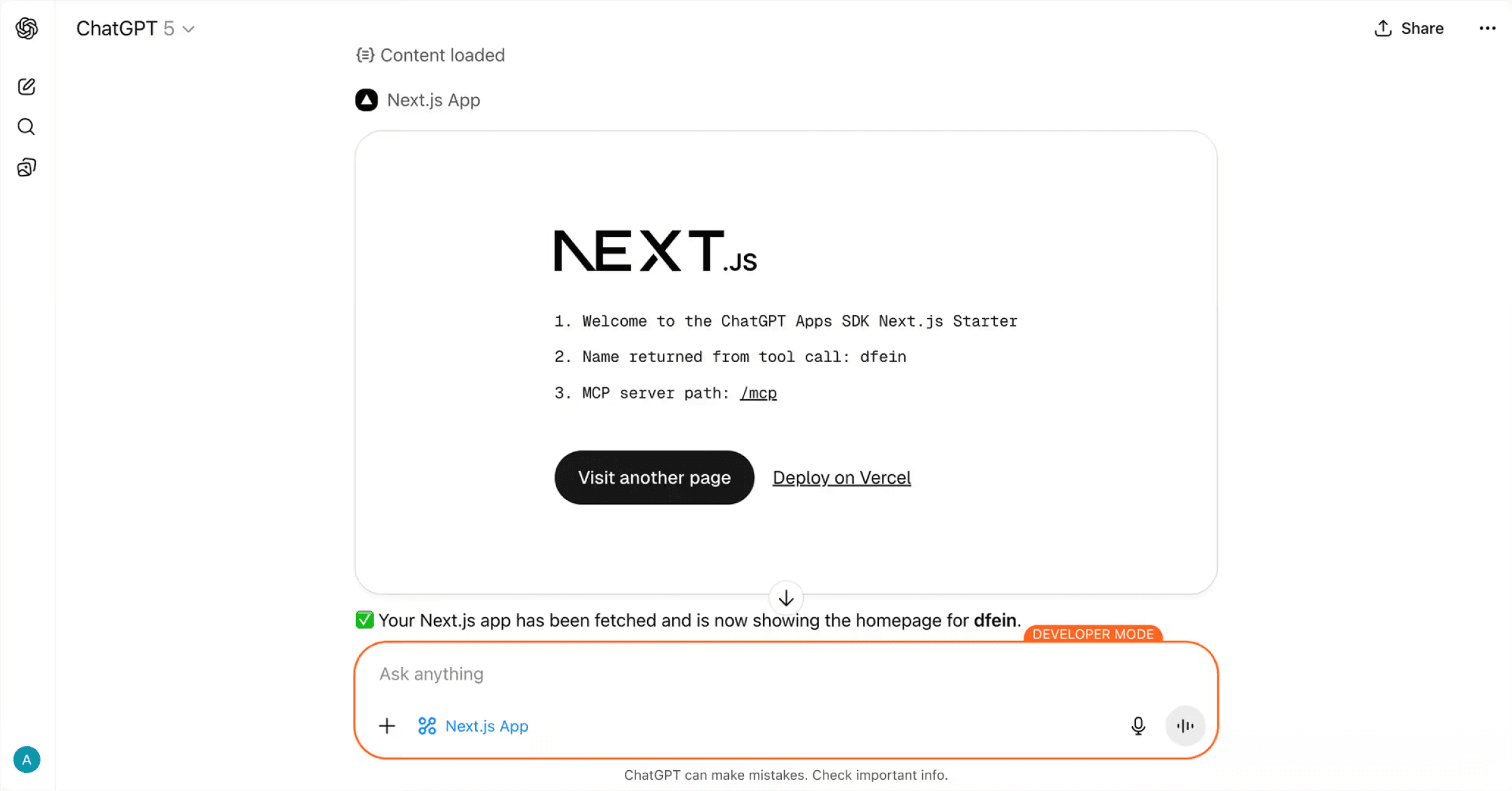
This project shows how to integrate a Next.js application with the ChatGPT Apps SDK using the Model Context Protocol (MCP). It includes a working MCP server that exposes tools and resources that can be called from ChatGPT, with responses rendered natively in ChatGPT.

Key Components

1. MCP Server Route (app/mcp/route.ts)

The core MCP server implementation that exposes tools and resources to ChatGPT.

Key features:

  • Tool registration with OpenAI-specific metadata
  • Resource registration that serves HTML content for iframe rendering
  • Cross-linking between tools and resources via templateUri

OpenAI-specific metadata:

{
"openai/outputTemplate": widget.templateUri, // Links to resource
"openai/toolInvocation/invoking": "Loading...", // Loading state text
"openai/toolInvocation/invoked": "Loaded", // Completion state text
"openai/widgetAccessible": false, // Widget visibility
"openai/resultCanProduceWidget": true // Enable widget rendering
}

Full configuration options: OpenAI Apps SDK MCP Documentation

2. Asset Configuration (next.config.ts)

Critical: Set assetPrefix to ensure /_next/ static assets are fetched from the correct origin:

const nextConfig: NextConfig = {
assetPrefix: baseURL, // Prevents 404s on /_next/ files in iframe
};

Without this, Next.js will attempt to load assets from the iframe's URL, causing 404 errors.

3. CORS Middleware (middleware.ts)

Handles browser OPTIONS preflight requests required for cross-origin RSC (React Server Components) fetching during client-side navigation:

export function middleware(request: NextRequest) {
if (request.method === "OPTIONS") {
// Return 204 with CORS headers
}
// Add CORS headers to all responses
}

4. SDK Bootstrap (app/layout.tsx)

The <NextChatSDKBootstrap> component patches browser APIs to work correctly within the ChatGPT iframe:

What it patches:

  • history.pushState / history.replaceState - Prevents full-origin URLs in history
  • window.fetch - Rewrites same-origin requests to use the correct base URL
  • <html> attribute observer - Prevents ChatGPT from modifying the root element

Required configuration:

<html lang="en" suppressHydrationWarning>
<head>
<NextChatSDKBootstrap baseUrl={baseURL} />
</head>
<body>{children}</body>
</html>

Note: suppressHydrationWarning is currently required because ChatGPT modifies the initial HTML before the Next.js app hydrates, causing hydration mismatches.

Getting Started

Installation

npm install
# or
pnpm install

Development

npm run dev
# or
pnpm dev

Open http://localhost:3000 to see the app.

Testing the MCP Server

The MCP server is available at:

http://localhost:3000/mcp

Connecting from ChatGPT

  1. Deploy your app to Vercel
  2. In ChatGPT, navigate to Settings → Connectors → Create and add your MCP server URL with the /mcp path (e.g., https://your-app.vercel.app/mcp)

Note: Connecting MCP servers to ChatGPT requires developer mode access. See the connection guide for setup instructions.

Project Structure

app/
├── mcp/
│ └── route.ts # MCP server with tool/resource registration
├── layout.tsx # Root layout with SDK bootstrap
├── page.tsx # Homepage content
└── globals.css # Global styles
middleware.ts # CORS handling for RSC
next.config.ts # Asset prefix configuration

How It Works

  1. Tool Invocation: ChatGPT calls a tool registered in app/mcp/route.ts
  2. Resource Reference: Tool response includes templateUri pointing to a registered resource
  3. Widget Rendering: ChatGPT fetches the resource HTML and renders it in an iframe
  4. Client Hydration: Next.js hydrates the app inside the iframe with patched APIs
  5. Navigation: Client-side navigation uses patched fetch to load RSC payloads

Learn More

  • OpenAI Apps SDK Documentation
  • OpenAI Apps SDK - MCP Server Guide
  • Model Context Protocol
  • Next.js Documentation

Deployment

This project is designed to work seamlessly with Vercel deployment. The baseUrl.ts configuration automatically detects Vercel environment variables and sets the correct asset URLs.

The configuration automatically handles:

  • Production URLs via VERCEL_PROJECT_PRODUCTION_URL
  • Preview/branch URLs via VERCEL_BRANCH_URL
  • Asset prefixing for correct resource loading in iframes
GitHub
Ownervercel-labs
Repositorychatgpt-apps-sdk-nextjs-starter
Use Cases
Starter
AI
Stack
Next.js
None

Related Templates

MCP with Next.js

Run an Model Context Protocol (MCP) server on Vercel with Next.js.
MCP with Next.js thumbnail

MCP with Express

Run a Model Context Protocol (MCP) server on Vercel with Express.
MCP with Express thumbnail

Hono MCP remote server

A MCP server that does simple math operations, built on Hono
Hono MCP remote server thumbnail

Agent Stack

  • AI SDK
  • AI Gateway
  • Sandbox
  • Workflows
  • EveNew
  • ConnectNew

Core Platform

  • CI/CD
  • Content Delivery
  • Fluid Compute
  • Observability

Security

  • Platform Security
  • WAF
  • Bot Management
  • Bot ID

Tools

  • Vercel DropNew
  • Vercel Agent
  • Vercel PluginNew
  • Next.js
  • Domains
  • v0

Frameworks

  • Nuxt
  • SvelteKit
  • Nitro
  • Turborepo
  • Tanstack Start
  • FastAPI
  • xmcp
  • All frameworks

SDKs

  • Vercel SDK
  • Workflow SDKNew
  • Flags SDK
  • Chat SDKNew
  • Queues SDKNew
  • Streamdown

Build

  • AI Apps
  • Web Apps
  • Marketing Sites
  • Platforms
  • Commerce
  • Platform Engineers
  • Design Engineers

Learn

  • Docs
  • Blog
  • Changelog
  • Knowledge Base
  • Academy
  • Articles
  • Community

Explore

  • Customers
  • Marketplace
  • Templates
  • Partner Finder
  • Vercel + AWS

Company

  • About
  • Careers
  • Press
  • Events
  • Startups
  • Shipped on Vercel
  • Open Source Program
  • Enterprise
  • Pricing
  • Help

Legal & Trust

  • Privacy Policy
  • Terms of Service
  • Cookie Policy
  • DPA
  • Acceptable Use Policy
  • Legal (all documents)
  • Trust Center
  • Status

Social

  • GitHub
  • X
  • LinkedIn
  • YouTube
  • Instagram
  • VercelVercel
Agent Stack
  • AI SDK
  • AI Gateway
  • Sandbox
  • Workflows
  • Eve
Core Platform
  • Security
  • Content Delivery
  • Fluid Compute
  • Observability
  • CI/CD
Tools
  • Next.js
  • Vercel Agent
  • Vercel Plugin
  • Domains
  • v0
Learn
  • Docs
  • About
  • Blog
  • Changelog
  • Knowledge Base
Build
  • AI Apps
  • Web Apps
  • Marketing Sites
  • Platforms
  • Commerce
Explore
  • Customers
  • Marketplace
  • Partner Finder
  • AWS
  • Community
EnterprisePricing
Contact
Log InSign Up
Dashboard

Products

Agent Stack

  • AI SDK
  • AI Gateway
  • Sandbox
  • Workflows
  • Eve

Core Platform

  • Security
  • Content Delivery
  • Fluid Compute
  • Observability
  • CI/CD

Tools

  • Next.js
  • Vercel Agent
  • Vercel Plugin
  • Domains
  • v0
Resources

Learn

  • Docs
  • About
  • Blog
  • Changelog
  • Knowledge Base

Build

  • AI Apps
  • Web Apps
  • Marketing Sites
  • Platforms
  • Commerce

Explore

  • Customers
  • Marketplace
  • Partner Finder
  • AWS
  • Community
Enterprise
Pricing
Sign UpLog In
Contact
DeployView Demo

Loading status…

Select a display theme: